Excel template · HR & payroll

Attendance Sheet & Leave Tracker in Excel (Monthly Register)

Pick a month and the register lays out the dates, greys out weekly offs and your holidays, and gives a grid to mark each employee present, absent, on half day, on leave or on duty. It counts every code, highlights days not yet marked and works out loss-of-pay and paid days for payroll.

For: Small businesses, factories, offices and HR teams that keep attendance in Excel.

Free download · no sign-up · no macros · Excel 2010+, Google Sheets, LibreOffice

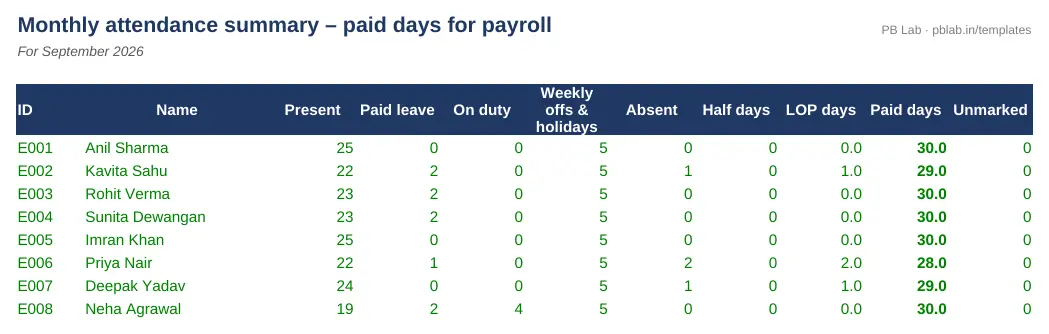
Preview of the Attendance & Leave Tracker Excel template with sample data
Main sheet with sample data

At a glance

What it is
Attendance & Leave Tracker — an Excel workbook for Indian employers, HR and payroll teams
Free edition
5 sheets (Guide, Settings, Employees, Attendance, Month Summary) — free download, no sign-up
Pro edition
8 sheets, adds 12 monthly sheets (Apr–Mar) and Leave Balance and Year Summary — ₹19 one-time (regular ₹99)
Works in
Microsoft Excel 2010 or later, Google Sheets, LibreOffice Calc — no macros
Checked
Recalculated with zero formula errors; sample data and a Guide sheet included
Made by
Prakash Bagchi, finance professional, PB Lab (Raipur, India)

Free vs Pro: what you get

SheetFreePro
Guide
What it does, how to use it, assumptions and a live status check
Settings
Financial year, weekly off(s), holiday list and leave entitlements
Employees
Employee list with opening CL, SL and EL balances
Attendance
Monthly grid with automatic dates, weekly offs, holidays and code counts for 100 employees
Month Summary
Present, leave, absent, LOP and paid days per employee, with checks
12 monthly sheets (Apr–Mar)
A full financial year of attendance, each month set up automatically
—
Leave Balance
Opening + entitlement − leave taken for CL, SL and EL, with carry-forward and encashable EL
—
Year Summary
Paid days and loss-of-pay days for every employee and month
—

Pro edition

Get Attendance & Leave Tracker – Pro

₹19₹9981% OFF

Everything in the free edition, plus:

  • 12 monthly sheets (Apr–Mar) — A full financial year of attendance, each month set up automatically
  • Leave Balance — Opening + entitlement − leave taken for CL, SL and EL, with carry-forward and encashable EL
  • Year Summary — Paid days and loss-of-pay days for every employee and month
  • One-time payment, instant .xlsx download, free updates
+91

Secure payment by Razorpay · UPI, cards, netbanking & wallets

We use your details only to deliver the file and support your purchase. See our privacy policy and terms.

Need more than one? The HR & Payroll Kit has all 9 hr & payroll Pro templates, including this one, for ₹134.

How to use it

  1. 1Download the free file and read the Guide sheet.
  2. 2On Settings, set the financial year, weekly off and your holiday list, and the leave entitlements.
  3. 3On Employees, list your staff with their opening leave balances.
  4. 4On Attendance, choose the month and mark each working day with P, A, HD, CL, SL, EL or OD from the drop-down.
  5. 5Use the paid days and LOP days in Month Summary for payroll.

Why a proper attendance register matters

Attendance decides how much each employee is paid, how much leave they have left and, at exit, how much leave is encashed. It is also a statutory record: state Shops and Establishments Acts and the labour codes expect employers to keep registers of attendance, leave and wages and to produce them on inspection. A clear monthly register that ties into payroll saves arguments at month-end and at audit.

How the register works

Choose the month and the sheet fills in the dates and weekdays. Weekly offs (one or two days a week, as you set) and the holidays on your list are greyed out and counted automatically, so you only mark working days. The codes are P (present), A (absent – loss of pay), HD (half day – half a day's loss of pay), CL, SL and EL (paid leave) and OD (on duty or working from home).

For each employee the register counts every code and the unmarked working days, which are highlighted so nothing is missed. Paid days are the days in the month less absent days and half of the half days; weekly offs, holidays and paid leave are all paid.

Leave entitlement and carry forward

Leave rules come from your state's Shops and Establishments Act or the factory rules, and from your own policy – so the entitlements for casual, sick and earned leave are inputs. Under the Occupational Safety, Health and Working Conditions Code, 2020, workers who have worked 180 days in a year earn one day of annual leave for every 20 days worked, can carry forward up to 30 days, and can encash accumulated leave on leaving. The Pro edition tracks balances through the year and shows the carry-forward and encashable earned leave for each employee.

Feeding payroll

The Month Summary gives LOP days and paid days per employee – exactly what the Salary Sheet & Payroll Register template needs. Copy the LOP days across, and the payroll pro-rates pay automatically.

Before you run payroll, check two things in the summary: the 'Unmarked' column should be zero for everyone, and each employee's days should add up to the days in the month – the summary flags any row that doesn't. Fixing a missed day before salaries are paid is far easier than recovering an overpayment later.

Free vs Pro

The free edition is a complete monthly register you can reuse by changing the month. The Pro edition holds the whole financial year – twelve monthly sheets from April to March – with a leave balance that updates as leave is marked and a year summary of paid days and loss of pay for every employee.

Written by Prakash Bagchi, finance professional and founder of PB Lab. Last reviewed .

Frequently asked questions

How are paid days calculated?

Days in the month minus absent days and half of the half days. Weekly offs, holidays, paid leave and on-duty days are all paid.

Do I have to mark Sundays and holidays?

No. Weekly offs and the holidays you list in Settings are marked and counted automatically; you only mark working days.

Can I set two weekly offs, like Saturday and Sunday?

Yes. Settings has a weekly off and an optional second weekly off.

How much earned leave can be carried forward?

It depends on your state law and policy. The OSH Code, 2020 allows workers to carry forward up to 30 days of annual leave; the template lets you set your own limit.

Does it work with the payroll template?

Yes. Copy the LOP days from Month Summary into the LOP column of the Salary Sheet & Payroll Register template.

How many employees does it handle?

Up to 100 employees and 30 holidays.

How much does the Pro edition cost and how do I get it?

The Pro edition is ₹19 (regular price ₹99), a one-time payment through Razorpay by UPI, card, netbanking or wallet. You download the .xlsx file right after paying, and the download page works again later if you bookmark it. Pro adds: 12 monthly sheets (Apr–Mar), Leave Balance, Year Summary.

Related free calculators

More Excel templates

See all templates →

Disclaimer: This template is a working aid, not legal, tax or accounting advice. Sample data is fictional. Laws, rates and thresholds change — verify them against the current Act, rules and notifications, or with a qualified professional, before relying on the results. PB Lab is not responsible for decisions made using this file.