Excel template · Finance

Small Business Expense Tracker & Monthly Profit and Loss in Excel

Record every money-in and money-out with a category and account. The workbook builds a month-by-month profit and loss for the financial year – income, cost of sales, gross profit, expenses and net profit – and shows the balance in cash and each bank or UPI account.

For: Shop owners, freelancers, home businesses and small service firms who want simple books without accounting software.

Free download · no sign-up · no macros · Excel 2010+, Google Sheets, LibreOffice

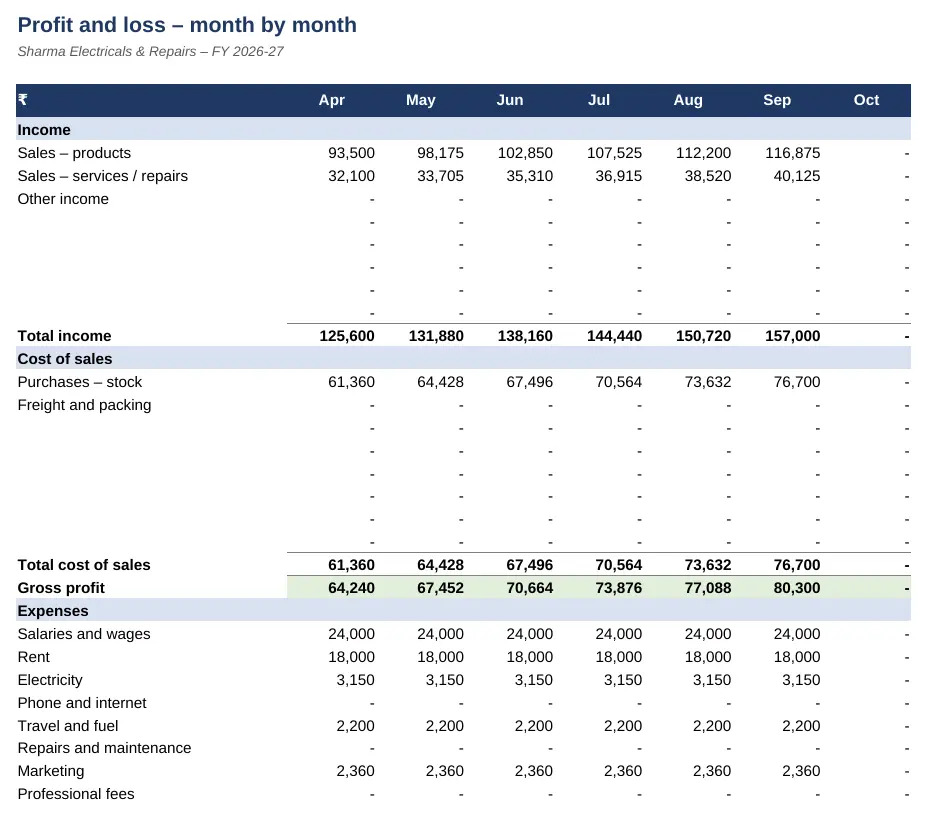
Preview of the Expense Tracker & Monthly P&L Excel template with sample data
Main sheet with sample data

At a glance

What it is
Expense Tracker & Monthly P&L — an Excel workbook for Indian businesses and accountants
Free edition
5 sheets (Guide, Setup, Cash Book, Monthly P&L, Balances) — free download, no sign-up
Pro edition
7 sheets, adds GST Input Credit and Dashboard — ₹19 one-time (regular ₹99)
Works in
Microsoft Excel 2010 or later, Google Sheets, LibreOffice Calc — no macros
Checked
Recalculated with zero formula errors; sample data and a Guide sheet included
Made by
Prakash Bagchi, finance professional, PB Lab (Raipur, India)

Free vs Pro: what you get

SheetFreePro
Guide
What it does, how to use it, assumptions and a live status check
Setup
Business name, financial year, categories with their type, and opening balances of cash and bank accounts
Cash Book
Up to 3,000 entries with date, description, category, account and amount
Monthly P&L
Income, cost of sales, gross profit, expenses and net profit for each month, with % of sales
Balances
Opening, money in, money out and current balance for each cash, bank and UPI account
GST Input Credit
Month-wise GST in purchase bills – likely claimable, on stock, on capital goods and at risk
—
Dashboard
Income vs expense chart, year-to-date profit and margin, best month and top expense categories
—

Pro edition

Get Expense Tracker & Monthly P&L – Pro

₹19₹9981% OFF

Everything in the free edition, plus:

  • GST Input Credit — Month-wise GST in purchase bills – likely claimable, on stock, on capital goods and at risk
  • Dashboard — Income vs expense chart, year-to-date profit and margin, best month and top expense categories
  • One-time payment, instant .xlsx download, free updates
+91

Secure payment by Razorpay · UPI, cards, netbanking & wallets

We use your details only to deliver the file and support your purchase. See our privacy policy and terms.

Need more than one? The Finance & Accounts Kit has all 14 finance Pro templates, including this one, for ₹208.

How to use it

  1. 1Download the free file and read the Guide sheet.
  2. 2On Setup, enter your business name and financial year, review the categories and enter opening balances.
  3. 3In the Cash Book, record every receipt and payment with its category and account.
  4. 4Open Monthly P&L to see profit month by month.
  5. 5Check Balances against your bank statement and cash in hand.

Simple books that still tell you the truth

Many small businesses run on a notebook and the bank app until tax time. That works until you need to know whether last month was profitable, why cash is short, or what to show a bank. A cash book with categories is the smallest system that answers those questions: one line per transaction, and the workbook does the adding up.

Income, cost of sales and expenses

Each category has a type. Income is money earned from customers. Cost of sales is what you spend directly on what you sell – stock bought for resale, freight in, materials. Expenses are running costs such as salaries, rent, electricity, phone and travel. Income minus cost of sales is gross profit; gross profit minus expenses is net profit. The monthly P&L shows all three for each month of the April–March financial year, with each line as a percentage of sales.

Why some payments aren't expenses

Money taken out by the owner (drawings), money put in, loans received or repaid, equipment purchases and GST paid to the government all move cash, but they aren't income or expenses. They are kept in a separate 'Not P&L' section so your profit isn't distorted – and the sheet reconciles profit plus these items to the actual change in cash. Equipment you buy is a capital asset; its cost is recovered through depreciation, which your accountant will work out at year end.

Cash basis and GST

This is cash-basis book-keeping: income and expenses are recorded when money moves. If you give credit to customers, track invoices separately (the Freelancer Invoice & Payment Tracker does this) so you know what's still due. If you are GST-registered, enter amounts including GST and note the GST part of purchase bills. The Pro edition totals that input tax credit by month and highlights bills without a supplier GSTIN – credit you may lose unless the bill is corrected.

Monthly habits

Enter transactions at least weekly. At month end, match the Balances sheet with your bank statement and cash in hand, and look at the month's profit and the biggest expense lines. Ten minutes a month is enough to spot a rising cost or a falling margin early.

Free vs Pro

The free edition gives you the cash book, the monthly profit and loss and account balances. The Pro edition adds a GST input-credit tracker and a dashboard with an income-versus-expense chart, year-to-date margin, the best month and your largest expense categories.

Written by Prakash Bagchi, finance professional and founder of PB Lab. Last reviewed .

Frequently asked questions

What is the difference between gross profit and net profit?

Gross profit is income minus cost of sales (what you spent on the goods or services sold). Net profit is gross profit minus running expenses such as rent, salaries and electricity.

Are owner's drawings an expense?

No. Drawings are money taken out of the business by the owner. They reduce cash but not profit, so the template shows them separately.

How do I record buying equipment?

Use the 'Equipment purchase' category (Not P&L). It is a capital asset, recovered through depreciation, not a monthly expense.

Should I enter amounts with or without GST?

Enter what you actually paid or received, including GST. If you're GST-registered, note the GST in purchase bills separately so input credit can be tracked.

Can I add my own categories?

Yes. Add them on Setup with a type (Income, Cost of sales, Expense or Not P&L) and they appear in the drop-down and the P&L.

Is this enough for my income-tax return?

It gives you income, expenses and profit for the year, which your CA can use. Businesses needing audited accounts or GST returns will still need proper books.

How much does the Pro edition cost and how do I get it?

The Pro edition is ₹19 (regular price ₹99), a one-time payment through Razorpay by UPI, card, netbanking or wallet. You download the .xlsx file right after paying, and the download page works again later if you bookmark it. Pro adds: GST Input Credit, Dashboard.

Related free calculators

More Excel templates

See all templates →

Disclaimer: This template is a working aid, not legal, tax or accounting advice. Sample data is fictional. Laws, rates and thresholds change — verify them against the current Act, rules and notifications, or with a qualified professional, before relying on the results. PB Lab is not responsible for decisions made using this file.