Excel template · Finance

Budget vs Actual Variance Analysis Template in Excel

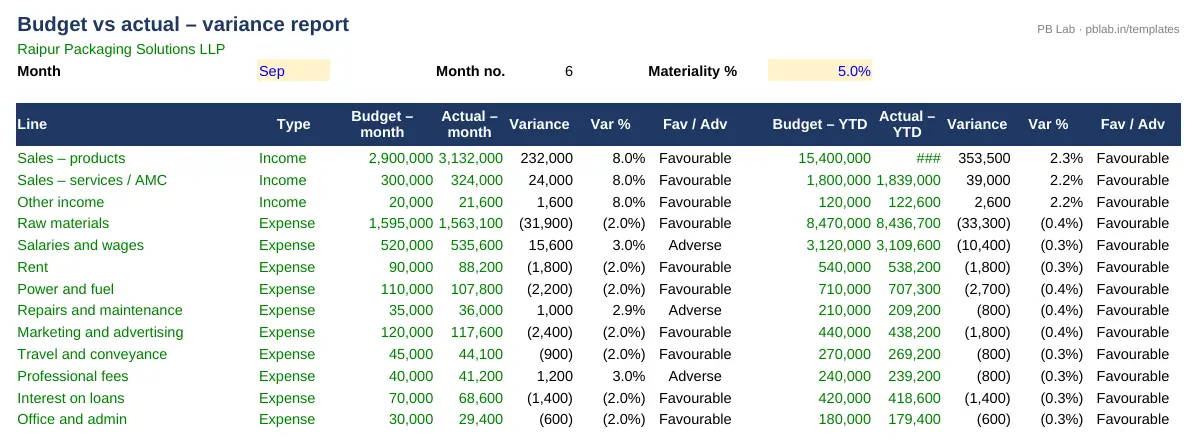
Enter the year's budget once, add actuals as each month closes, and pick a month. The variance report shows month and year-to-date budget, actual, variance and %, marks each line favourable or adverse, and highlights anything above your materiality limit.

For: Business owners, finance managers and MIS teams running a monthly review.

Free download · no sign-up · no macros · Excel 2010+, Google Sheets, LibreOffice

Preview of the Budget vs Actual & Cash Flow Forecast Excel template with sample data
Main sheet with sample data

At a glance

What it is
Budget vs Actual & Cash Flow Forecast — an Excel workbook for Indian businesses and accountants
Free edition
4 sheets (Guide, Budget, Actuals, Variance) — free download, no sign-up
Pro edition
5 sheets, adds Cash Flow Forecast — ₹19 one-time (regular ₹99)
Works in
Microsoft Excel 2010 or later, Google Sheets, LibreOffice Calc — no macros
Checked
Recalculated with zero formula errors; sample data and a Guide sheet included
Made by
Prakash Bagchi, finance professional, PB Lab (Raipur, India)

Free vs Pro: what you get

SheetFreePro
Guide
What it does, how to use it, assumptions and a live status check
Budget
One line per income or expense head with its type and 12 monthly figures
Actuals
The same lines, filled in as each month closes
Variance
Month and YTD variance with favourable/adverse flags and a materiality filter
Cash Flow Forecast
12-month cash forecast from the budget with collection and payment timing, minimum-cash alert and chart
—

Pro edition

Get Budget vs Actual & Cash Flow Forecast – Pro

₹19₹9981% OFF

Everything in the free edition, plus:

  • Cash Flow Forecast — 12-month cash forecast from the budget with collection and payment timing, minimum-cash alert and chart
  • One-time payment, instant .xlsx download, free updates
+91

Secure payment by Razorpay · UPI, cards, netbanking & wallets

We use your details only to deliver the file and support your purchase. See our privacy policy and terms.

Need more than one? The Finance & Accounts Kit has all 14 finance Pro templates, including this one, for ₹208.

How to use it

  1. 1Download the free file and read the Guide sheet.
  2. 2On Budget, enter the company, the year and one line per income or expense head with its 12 monthly figures.
  3. 3On Actuals, enter actual figures for each month that has closed.
  4. 4On Variance, pick the report month and set the materiality %.
  5. 5Comment on the highlighted lines and share the report.

What a budget vs actual report is for

A budget is a plan; a budget vs actual report tells you how far reality has moved from the plan and where. Done every month, it turns the budget from a once-a-year exercise into a management tool: you see a cost creeping up or a revenue line slipping while there is still time to act.

Favourable and adverse

A variance is favourable when it improves profit — income above budget or expenses below budget — and adverse when it reduces profit. The template knows whether each line is income or expense, so it labels the variance correctly without you flipping signs. It shows both the amount and the percentage, because a ₹50,000 overspend means something very different on a ₹1 lakh line than on a ₹50 lakh line.

Month and year-to-date

Monthly figures are noisy — a bill booked in the wrong month swings the variance one way and back again the next. Year-to-date figures smooth that out and show the real trend. The report gives both side by side for the month you pick, so you can tell a timing difference from a genuine overrun.

Materiality: comment on what matters

Not every variance deserves a paragraph. Set a materiality percentage and the template highlights only the lines that cross it, so the monthly review focuses on the few items that need an explanation and an action — not on rounding differences in stationery.

Why profit and cash are different

A business can be on budget for profit and still run short of cash: customers pay late, stock builds up, a loan instalment falls due, GST and TDS have to be paid on fixed dates. That is why a cash flow forecast sits alongside the budget. The Pro edition builds a 12-month forecast from your budget, using collection timing (same month, next month or the month after), supplier credit, opening debtors and creditors, capital spending, loan repayments and statutory payments.

Set a minimum cash balance and the forecast flags any month where closing cash falls below it, with the lowest balance and the month it occurs. Knowing that three months ahead gives you time to arrange a limit, chase collections or defer spending.

Tips for a useful budget

Build the budget at the level you will actually review — a dozen to thirty lines is plenty for most small businesses. Phase it by month based on seasonality rather than dividing the annual figure by twelve. And revisit it at the half-year: a reforecast is better than explaining the same variance six months running.

Written by Prakash Bagchi, finance professional and founder of PB Lab. Last reviewed .

Frequently asked questions

What is a favourable variance?

One that increases profit compared with budget — income higher than budgeted or expenses lower than budgeted.

Should I look at monthly or year-to-date variance?

Both. Monthly shows what happened this month; year-to-date smooths out timing differences and shows the trend.

How many budget lines can I enter?

The template has room for dozens of lines; add them anywhere in the yellow area of the Budget sheet.

Does it include a cash flow forecast?

The Pro edition adds a 12-month cash flow forecast built from the budget, with a minimum-cash alert and chart.

Can I use it for a financial year starting in April?

Yes. The sample is for an April–March year; month labels follow the year you set.

Does it work in Google Sheets?

Yes. It uses only standard functions and has been tested with zero formula errors.

How much does the Pro edition cost and how do I get it?

The Pro edition is ₹19 (regular price ₹99), a one-time payment through Razorpay by UPI, card, netbanking or wallet. You download the .xlsx file right after paying, and the download page works again later if you bookmark it. Pro adds: Cash Flow Forecast.

Related free calculators

More Excel templates

See all templates →

Disclaimer: This template is a working aid, not legal, tax or accounting advice. Sample data is fictional. Laws, rates and thresholds change — verify them against the current Act, rules and notifications, or with a qualified professional, before relying on the results. PB Lab is not responsible for decisions made using this file.