Excel template · Finance

Debtors Ageing Report Format in Excel (with MSME Payables Check)

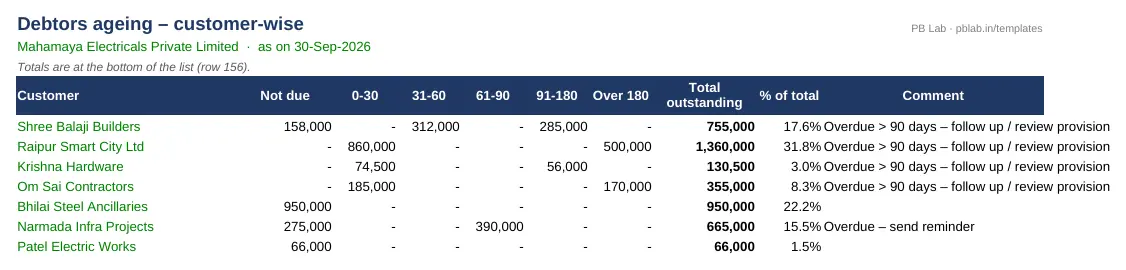
Enter open sales invoices with their credit days. The template ages each one from its due date into Not due, 0-30, 31-60, 61-90, 91-180 and Over 180 days, and builds a customer-wise summary with follow-up comments that updates as you add invoices.

For: Accounts receivable teams, credit controllers and business owners chasing collections.

Free download · no sign-up · no macros · Excel 2010+, Google Sheets, LibreOffice

Preview of the Receivables & Payables Ageing Excel template with sample data
Main sheet with sample data

At a glance

What it is
Receivables & Payables Ageing — an Excel workbook for Indian businesses and accountants
Free edition
3 sheets (Guide, AR Invoices, Customer Summary) — free download, no sign-up
Pro edition
5 sheets, adds AP Ageing (MSME) and ECL Provision — ₹19 one-time (regular ₹99)
Works in
Microsoft Excel 2010 or later, Google Sheets, LibreOffice Calc — no macros
Checked
Recalculated with zero formula errors; sample data and a Guide sheet included
Made by
Prakash Bagchi, finance professional, PB Lab (Raipur, India)

Free vs Pro: what you get

SheetFreePro
Guide
What it does, how to use it, assumptions and a live status check
AR Invoices
Open invoices with due date, days overdue and bucket as on any date
Customer Summary
Customer-wise outstanding by bucket, share of total and follow-up comment
AP Ageing (MSME)
Creditors ageing with the MSMED 45-day limit, estimated section 16 interest and year-end tax-disallowance risk
—
ECL Provision
Expected credit loss provision matrix by ageing bucket (Ind AS 109 simplified approach)
—

Pro edition

Get Receivables & Payables Ageing – Pro

₹19₹9981% OFF

Everything in the free edition, plus:

  • AP Ageing (MSME) — Creditors ageing with the MSMED 45-day limit, estimated section 16 interest and year-end tax-disallowance risk
  • ECL Provision — Expected credit loss provision matrix by ageing bucket (Ind AS 109 simplified approach)
  • One-time payment, instant .xlsx download, free updates
+91

Secure payment by Razorpay · UPI, cards, netbanking & wallets

We use your details only to deliver the file and support your purchase. See our privacy policy and terms.

Need more than one? The Finance & Accounts Kit has all 14 finance Pro templates, including this one, for ₹208.

How to use it

  1. 1Download the free file and read the Guide sheet.
  2. 2Set the company name and the ageing date on AR Invoices.
  3. 3Enter or paste open invoices: customer, invoice number, date, amount, amount received and credit days.
  4. 4Open Customer Summary — check that the difference at the bottom is zero.
  5. 5Send reminders for 31-90 day items, escalate anything over 90 days and review your provision for doubtful debts.

What an ageing report shows

An ageing report sorts unpaid invoices by how long they have been outstanding. It turns a single 'sundry debtors' figure into a picture of risk: money that is not yet due, money a few weeks late, and money that may never come. The older a receivable, the less likely it is to be collected, so the report tells you where to spend your follow-up time.

This template ages from the due date (invoice date plus credit days), not the invoice date, so a customer on 60-day terms isn't flagged as late on day 31. 'Not due' means the invoice is still within its credit period.

Using it for collections

The customer summary ranks customers by outstanding and shows how much of each balance sits in each bucket, plus a suggested follow-up. A practical rhythm: a polite reminder at 1-30 days overdue, a call at 31-60, escalation and a hold on new supplies at 61-90, and a decision on legal action or provisioning beyond 90 days. Tracking days sales outstanding (DSO) month by month tells you whether collections are getting better or worse.

Schedule III ageing disclosure

Since the 2021 amendment, Schedule III requires companies to disclose trade receivables and trade payables ageing in the notes, in buckets of less than 6 months, 6 months to 1 year, 1-2 years, 2-3 years and more than 3 years, split into undisputed and disputed amounts. Schedule III counts from the due date of payment, or from the date of the transaction where no due date is specified. An invoice-level register like this one makes that note easy to prepare.

Paying MSME suppliers on time

On the payables side, section 15 of the MSMED Act, 2006 requires a buyer to pay a micro or small enterprise supplier within the agreed period, which cannot exceed 45 days from the day of acceptance; where there is no written agreement, the limit is 15 days. If payment is late, section 16 makes the buyer liable to pay compound interest with monthly rests at three times the bank rate notified by the RBI.

Income-tax law also disallows a deduction for amounts owed to micro and small enterprises that remain unpaid beyond the MSMED Act time limit, until the year in which they are actually paid — section 43B(h) under the 1961 Act, carried into the 2025 Act. Confirm the current provision with your adviser. The Pro edition caps due dates at the MSMED limit for registered micro and small suppliers, flags overdue amounts and estimates section 16 interest.

Expected credit loss

Companies following Ind AS 109 may use the simplified approach for trade receivables: a provision matrix that applies a loss rate to each ageing bucket, based on past experience adjusted for current conditions. The Pro edition builds that matrix from your ageing and shows the provision required and the entry for the period.

Written by Prakash Bagchi, finance professional and founder of PB Lab. Last reviewed .

Frequently asked questions

What are the usual ageing buckets?

Not due, 0-30, 31-60, 61-90, 91-180 and over 180 days past due. For Schedule III notes, companies use less than 6 months, 6 months-1 year, 1-2, 2-3 and more than 3 years.

Is ageing counted from the invoice date or the due date?

This template counts days overdue from the due date (invoice date plus credit days). Schedule III also uses the due date, or the transaction date where no due date is specified.

What is the MSME 45-day rule?

Under section 15 of the MSMED Act, a buyer must pay a micro or small supplier within the agreed period, not exceeding 45 days from acceptance (15 days if there is no written agreement).

What interest is payable for late payment to MSMEs?

Compound interest with monthly rests at three times the bank rate notified by the RBI, under section 16 of the MSMED Act.

Can I age payables in the free edition?

The free edition covers receivables. The Pro edition adds creditors ageing with the MSME check and an ECL provision matrix.

How many invoices can it handle?

Several hundred invoices and dozens of customers; the customer list builds itself as you add invoices.

How much does the Pro edition cost and how do I get it?

The Pro edition is ₹19 (regular price ₹99), a one-time payment through Razorpay by UPI, card, netbanking or wallet. You download the .xlsx file right after paying, and the download page works again later if you bookmark it. Pro adds: AP Ageing (MSME), ECL Provision.

Related free calculators

More Excel templates

See all templates →

Disclaimer: This template is a working aid, not legal, tax or accounting advice. Sample data is fictional. Laws, rates and thresholds change — verify them against the current Act, rules and notifications, or with a qualified professional, before relying on the results. PB Lab is not responsible for decisions made using this file.