Excel template · Tax & compliance

GSTR-2B Reconciliation Format in Excel

Paste your purchase register and the GSTR-2B download. The template matches invoices on supplier GSTIN and invoice number, compares taxable value and tax, and sorts every line into matched, mismatched, missing in 2B or missing in books — with ITC totals for each.

For: GST practitioners, accountants and businesses claiming input tax credit every month.

Free download · no sign-up · no macros · Excel 2010+, Google Sheets, LibreOffice

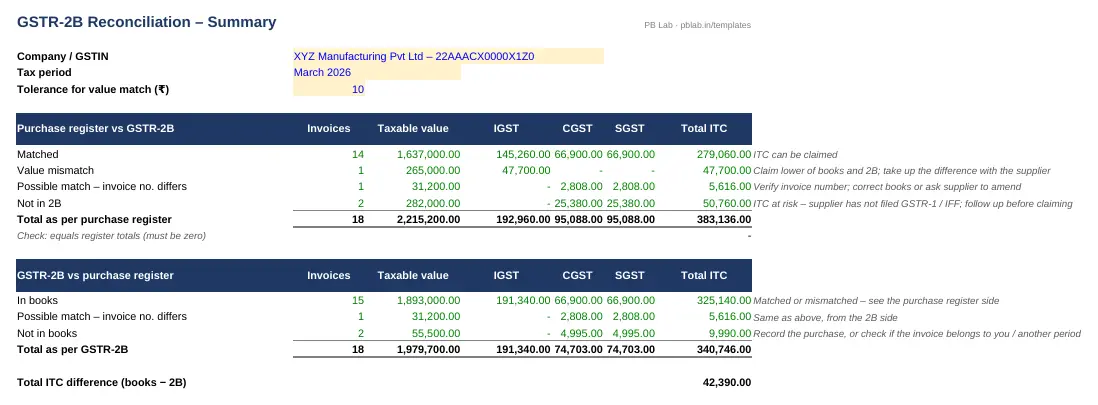
Preview of the GSTR-2B Reconciliation Excel template with sample data
Main sheet with sample data

At a glance

What it is
GSTR-2B Reconciliation — an Excel workbook for Indian taxpayers, businesses and tax practitioners
Free edition
4 sheets (Guide, Purchase Register, GSTR-2B, Summary) — free download, no sign-up
Pro edition
6 sheets, adds Supplier Follow-up and GSTR-3B ITC Working — ₹19 one-time (regular ₹99)
Works in
Microsoft Excel 2010 or later, Google Sheets, LibreOffice Calc — no macros
Checked
Recalculated with zero formula errors; sample data and a Guide sheet included
Made by
Prakash Bagchi, finance professional, PB Lab (Raipur, India)

Free vs Pro: what you get

SheetFreePro
Guide
What it does, how to use it, assumptions and a live status check
Purchase Register
Your booked purchase invoices with match result
GSTR-2B
Invoices from the GSTR-2B Excel download with match result
Summary
ITC by status — matched, value mismatch, not in 2B, not in books
Supplier Follow-up
Supplier-wise list of invoices missing from 2B, ready to email
—
GSTR-3B ITC Working
Table 4 working — matched ITC and the lower of books or 2B for mismatches
—

Pro edition

Get GSTR-2B Reconciliation – Pro

₹19₹9981% OFF

Everything in the free edition, plus:

  • Supplier Follow-up — Supplier-wise list of invoices missing from 2B, ready to email
  • GSTR-3B ITC Working — Table 4 working — matched ITC and the lower of books or 2B for mismatches
  • One-time payment, instant .xlsx download, free updates
+91

Secure payment by Razorpay · UPI, cards, netbanking & wallets

We use your details only to deliver the file and support your purchase. See our privacy policy and terms.

Need more than one? The Tax & Compliance Kit has all 5 tax & compliance Pro templates, including this one, for ₹74.

How to use it

  1. 1Download the free file and read the Guide sheet.
  2. 2Download GSTR-2B for the month from the GST portal (Excel) and paste the B2B invoice rows into the GSTR-2B sheet.
  3. 3Paste the month's purchase register from your books into Purchase Register.
  4. 4Set the tolerance (for rounding differences) at the top of Summary.
  5. 5Review the Summary: claim matched ITC, follow up with suppliers for invoices missing in 2B, and check mismatches.

Why GSTR-2B decides your ITC

GSTR-2B is the auto-drafted, static statement of input tax credit generated for each recipient every month on the GST portal. It is built from what your suppliers report in their GSTR-1 (or IFF) and other sources such as imports. Unlike the old GSTR-2A, it does not change after it is generated, which makes it the reference document for that month's claim.

Section 16(2)(aa) of the CGST Act allows input tax credit only if the details of the invoice have been furnished by the supplier and communicated to you in the auto-generated statement. From 1 January 2022, rule 36(4) limits the claim to invoices that appear in GSTR-2B. In practice: if an invoice isn't in your 2B, you can't claim it this month.

How the matching works

Each invoice is matched on supplier GSTIN plus a normalised invoice number — spaces, slashes, hyphens and dots are ignored and case doesn't matter, so 'inv/2025-26/023' and 'INV 202526 023' still match. Once matched, taxable value and IGST, CGST and SGST are compared within the tolerance you set. Each line ends up in one of four groups: matched, value mismatch, in books but not in 2B, and in 2B but not in books.

What to do with each group

Matched invoices can be claimed in GSTR-3B. Value mismatches usually mean a typing error at your end or the supplier's — check the original invoice and correct whichever side is wrong. Invoices in your books but not in 2B need supplier follow-up: the supplier may not have filed GSTR-1 or may have used a wrong GSTIN. Keep the ITC pending and claim it in the month it appears in 2B. Invoices in 2B but not in your books may be unrecorded purchases — or invoices that aren't yours, which you should reject.

Invoice Management System (IMS)

Since October 2024 the GST portal has an Invoice Management System where you can accept, reject or keep pending each invoice reported by suppliers before GSTR-2B is generated. Your actions in IMS flow into 2B. A reconciliation like this one helps you decide what to accept, reject or keep pending — doing it before the 2B cut-off saves reversals later.

Time limits to remember

Under section 16(4), ITC for invoices of a financial year can be claimed up to 30 November of the following year or the date of filing the annual return, whichever is earlier. Separately, if you do not pay the supplier within 180 days from the invoice date, the credit must be reversed with interest and can be re-claimed when you pay. Running this reconciliation every month keeps both deadlines under control.

Written by Prakash Bagchi, finance professional and founder of PB Lab. Last reviewed .

Frequently asked questions

What is the difference between GSTR-2A and GSTR-2B?

GSTR-2A is dynamic and keeps changing as suppliers file. GSTR-2B is a static monthly statement and is the basis for claiming ITC under rule 36(4).

Can I claim ITC for an invoice that is not in GSTR-2B?

Not in that month. Since 1 January 2022, ITC is restricted to invoices reflected in GSTR-2B. Follow up with the supplier and claim it in the month it appears.

Why don't invoice numbers match even though the invoice is correct?

Suppliers often type numbers differently — extra slashes, hyphens, dots or spaces. The template normalises numbers before matching to catch these.

How do I download GSTR-2B in Excel?

On the GST portal go to Returns Dashboard, choose the period, open GSTR-2B and click Download Excel. Paste the B2B sheet rows into the template.

Does it handle credit notes and imports?

The template reconciles B2B invoices. Credit and debit notes, imports (IMPG) and ISD credits should be reconciled separately. Enter amended invoices at their revised values.

What is the deadline to claim ITC for a year?

30 November of the following financial year or the date you file the annual return, whichever is earlier (section 16(4) of the CGST Act).

How much does the Pro edition cost and how do I get it?

The Pro edition is ₹19 (regular price ₹99), a one-time payment through Razorpay by UPI, card, netbanking or wallet. You download the .xlsx file right after paying, and the download page works again later if you bookmark it. Pro adds: Supplier Follow-up, GSTR-3B ITC Working.

Related free calculators

More Excel templates

See all templates →

Disclaimer: This template is a working aid, not legal, tax or accounting advice. Sample data is fictional. Laws, rates and thresholds change — verify them against the current Act, rules and notifications, or with a qualified professional, before relying on the results. PB Lab is not responsible for decisions made using this file.