Excel template · Finance

Bank Reconciliation Statement Format in Excel

Enter your bank book and the bank statement, then mark which entries have cleared. The template lists cheques not yet presented, deposits not yet credited and bank-only entries, and builds a BRS that proves the two balances agree.

For: Accountants and small-business owners doing month-end bank reconciliations.

Free download · no sign-up · no macros · Excel 2010+, Google Sheets, LibreOffice

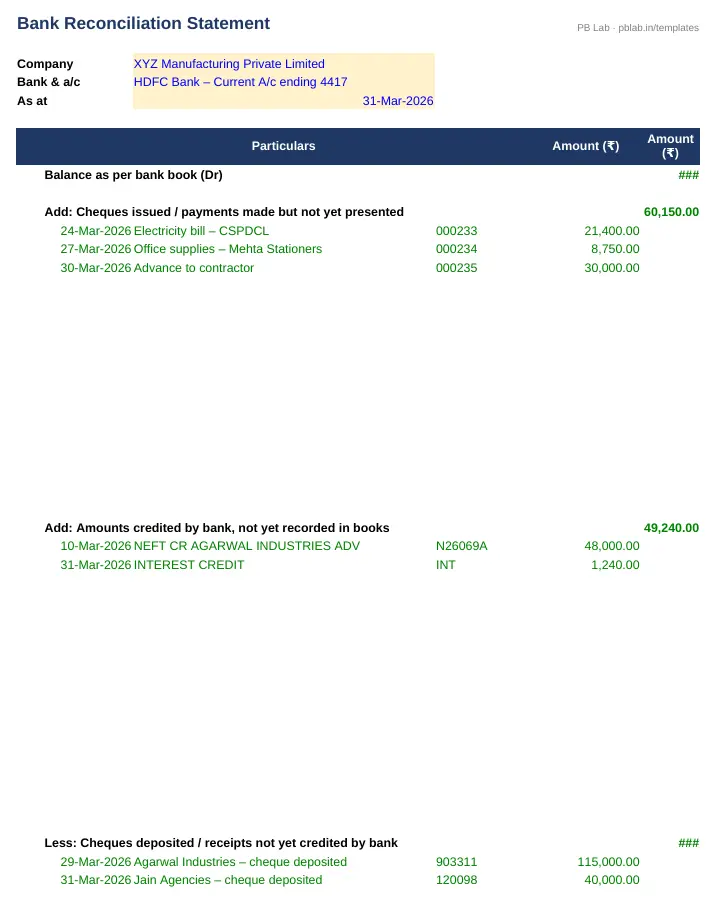
Preview of the Bank Reconciliation Statement Excel template with sample data
Main sheet with sample data

At a glance

What it is
Bank Reconciliation Statement — an Excel workbook for Indian businesses and accountants
Free edition
4 sheets (Guide, Bank Book, Bank Statement, BRS) — free download, no sign-up
Pro edition
5 sheets, adds Outstanding Review — ₹19 one-time (regular ₹99)
Works in
Microsoft Excel 2010 or later, Google Sheets, LibreOffice Calc — no macros
Checked
Recalculated with zero formula errors; sample data and a Guide sheet included
Made by
Prakash Bagchi, finance professional, PB Lab (Raipur, India)

Free vs Pro: what you get

SheetFreePro
Guide
What it does, how to use it, assumptions and a live status check
Bank Book
Your book entries for the bank account; mark Y when cleared
Bank Statement
Statement lines; mark N for items not yet in your books
BRS
Balance as per books reconciled to balance as per bank, with a zero-difference check
Outstanding Review
Ageing of uncleared items, stale-cheque flag, possible-match finder and suggested action
—

Pro edition

Get Bank Reconciliation Statement – Pro

₹19₹9981% OFF

Everything in the free edition, plus:

  • Outstanding Review — Ageing of uncleared items, stale-cheque flag, possible-match finder and suggested action
  • One-time payment, instant .xlsx download, free updates
+91

Secure payment by Razorpay · UPI, cards, netbanking & wallets

We use your details only to deliver the file and support your purchase. See our privacy policy and terms.

Need more than one? The Finance & Accounts Kit has all 14 finance Pro templates, including this one, for ₹208.

How to use it

  1. 1Download the free file and read the Guide sheet.
  2. 2Enter the opening balance and the month's bank-book entries in Bank Book; put Y against entries that appear on the bank statement.
  3. 3Enter the opening balance and paste the bank statement lines in Bank Statement; put N against lines not yet recorded in your books (charges, interest, ECS, direct credits).
  4. 4Fill in the company, bank and date on the BRS sheet.
  5. 5Check the BRS difference is zero; pass journal entries for bank charges and interest the bank has already booked.

Why balances differ

Your bank book and the bank statement record the same transactions, but not always on the same day. A bank reconciliation statement (BRS) explains the difference between the two closing balances at a date, item by item, so you know both records are right — and catch errors or fraud early.

The usual reconciling items are: cheques issued but not yet presented for payment; cheques or cash deposited but not yet credited by the bank; bank charges, interest and direct debits recorded by the bank but not yet in your books; direct credits such as NEFT receipts or interest that you haven't recorded; and cheques that were deposited but dishonoured.

How the template matches entries

You tick off each bank-book entry that appears on the statement (Y), and mark statement lines you haven't booked yet (N). Everything not ticked becomes the reconciling list — the template pulls those items into the BRS automatically, with a count if there are more than fit on the page. The Pro edition adds a match finder that points out statement lines with the same cheque number or amount.

The BRS then starts from the balance as per books, adds cheques issued but not presented, deducts deposits not yet credited, and adjusts for bank-only entries. The result should equal the balance as per bank statement, and the check cell turns ✔ when it does.

Fix your books, not just the statement

Items the bank has recorded but you haven't — bank charges, interest credited, direct debits for loan EMIs, GST on charges, NEFT receipts from customers — are not timing differences. They need journal entries in your books. After posting them, the only items left on the BRS should be genuine timing differences: cheques in transit and deposits in clearing.

Stale cheques

In India a cheque is valid for three months from the date written on it. A cheque you issued that has not been presented within three months is stale — the bank will not honour it. Leaving it on the BRS indefinitely overstates your payables-cleared position, so the usual practice is to reverse it in the books and re-issue the payment if it is still due. The Pro edition ages every outstanding item and flags stale cheques (90 days by default, adjustable).

Good reconciliation habits

Reconcile every bank account every month, soon after month-end. Keep the bank statement, the BRS and the supporting list together. Investigate any item that stays unreconciled for more than a month. And have someone other than the person who records payments review the BRS — it is one of the simplest internal controls a small business can have.

Written by Prakash Bagchi, finance professional and founder of PB Lab. Last reviewed .

Frequently asked questions

What is a bank reconciliation statement?

A statement that explains the difference between the bank balance in your books and the balance on the bank statement on the same date, so you can confirm both are correct.

How often should I prepare a BRS?

At least monthly for every bank account. Businesses with heavy transactions often reconcile weekly or daily.

How long is a cheque valid in India?

Three months from the date on the cheque. After that it is stale and the bank will not pay it.

Can the template read my bank's PDF statement?

No. Download the statement in Excel or CSV from net banking and paste the columns in. Most Indian banks offer an Excel download.

Does it match entries automatically?

The free edition uses simple Y/N ticks so you stay in control. The Pro edition adds a match finder that suggests possible matches by cheque number and amount.

Do I need to pass entries for bank charges?

Yes. Charges, interest and direct debits already on the bank statement must be recorded in your books. Only timing differences should remain on the BRS.

How much does the Pro edition cost and how do I get it?

The Pro edition is ₹19 (regular price ₹99), a one-time payment through Razorpay by UPI, card, netbanking or wallet. You download the .xlsx file right after paying, and the download page works again later if you bookmark it. Pro adds: Outstanding Review.

Related free calculators

More Excel templates

See all templates →

Disclaimer: This template is a working aid, not legal, tax or accounting advice. Sample data is fictional. Laws, rates and thresholds change — verify them against the current Act, rules and notifications, or with a qualified professional, before relying on the results. PB Lab is not responsible for decisions made using this file.