Excel template · Finance

Stock Register Format in Excel (Inventory with Reorder Alerts)

List your items with opening stock, record every purchase, issue, sale, return and adjustment, and the stock summary gives received, issued and closing quantity for any period, closing value at weighted average cost, and which items have fallen to their reorder level.

For: Shops, traders, distributors and small manufacturers who keep stock in Excel.

Free download · no sign-up · no macros · Excel 2010+, Google Sheets, LibreOffice

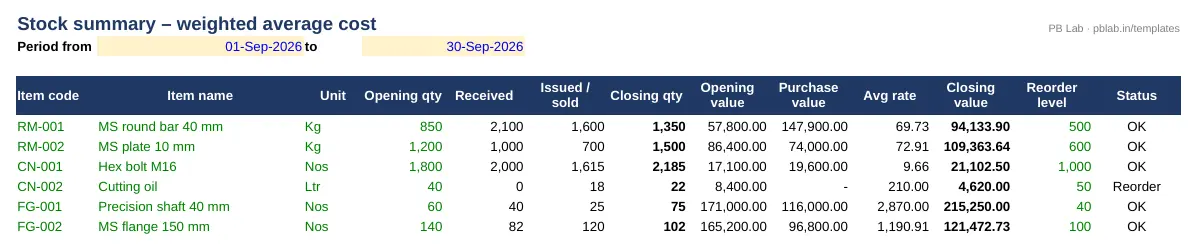
Preview of the Inventory & Stock Register Excel template with sample data
Main sheet with sample data

At a glance

What it is
Inventory & Stock Register — an Excel workbook for Indian businesses and accountants
Free edition
4 sheets (Guide, Items, Transactions, Stock Summary) — free download, no sign-up
Pro edition
7 sheets, adds FIFO & Ageing and FIFO Lots and Item Ledger — ₹19 one-time (regular ₹99)
Works in
Microsoft Excel 2010 or later, Google Sheets, LibreOffice Calc — no macros
Checked
Recalculated with zero formula errors; sample data and a Guide sheet included
Made by
Prakash Bagchi, finance professional, PB Lab (Raipur, India)

Free vs Pro: what you get

SheetFreePro
Guide
What it does, how to use it, assumptions and a live status check
Items
Item master with unit, category, opening quantity and rate, reorder level and location
Transactions
Up to 2,000 movements: purchase, return to supplier, issue, sale, sales return, production and adjustments
Stock Summary
Opening, received, issued and closing quantity, weighted average rate, closing value and reorder status
FIFO & Ageing
Closing stock on FIFO compared with weighted average, and split by age: 0–30, 31–90, 91–180 and over 180 days
—
FIFO Lots
How much of each purchase or production lot is still in stock
—
Item Ledger
Stock card for any item with every movement and the running balance
—

Pro edition

Get Inventory & Stock Register – Pro

₹19₹9981% OFF

Everything in the free edition, plus:

  • FIFO & Ageing — Closing stock on FIFO compared with weighted average, and split by age: 0–30, 31–90, 91–180 and over 180 days
  • FIFO Lots — How much of each purchase or production lot is still in stock
  • Item Ledger — Stock card for any item with every movement and the running balance
  • One-time payment, instant .xlsx download, free updates
+91

Secure payment by Razorpay · UPI, cards, netbanking & wallets

We use your details only to deliver the file and support your purchase. See our privacy policy and terms.

Need more than one? The Finance & Accounts Kit has all 14 finance Pro templates, including this one, for ₹208.

How to use it

  1. 1Download the free file and read the Guide sheet.
  2. 2On Items, add each item with its code, unit, opening quantity and rate, and reorder level.
  3. 3On Transactions, record every movement with date, item code, type, quantity and – for purchases and production – the rate.
  4. 4On Stock Summary, set the period and read closing stock and value.
  5. 5Reorder the items marked 'Reorder' and fix any negative stock or unknown codes.

Why keep a stock register

Stock is usually the biggest asset of a trading or manufacturing business after cash, and the easiest to lose track of. A stock register records every movement – what came in, what went out and why – so you know what you have, what it's worth, and when to reorder. It is also the record your auditor and bank will ask for: CARO 2020 requires auditors to report on physical verification of inventory, and banks look at stock statements for working-capital limits.

How the register works

Each item is listed once with its unit, opening quantity and rate. Every movement is a row in Transactions: purchases, production and sales returns increase stock; issues to production, sales, returns to suppliers and negative adjustments reduce it. The Stock Summary adds them up for the period you choose and compares the closing quantity with each item's reorder level. Negative stock – usually a missed purchase entry – is flagged so you can correct it before it distorts the value.

Weighted average or FIFO?

AS 2 (and Ind AS 2) allow inventory to be valued on a first-in-first-out (FIFO) or weighted average cost basis, at the lower of cost and net realisable value. The free edition uses weighted average: (opening value + cost of receipts) ÷ (opening quantity + quantity received). It smooths out price changes and is simple to apply. FIFO assumes the oldest stock is used first, so closing stock is valued at the most recent purchase prices – closer to current cost when prices are rising. The Pro edition calculates FIFO alongside weighted average and shows the difference.

Slow-moving stock

Stock that has been sitting for months ties up cash and may need to be written down to net realisable value. The Pro edition's ageing splits the FIFO closing stock by the age of the receipt it came from – 0–30, 31–90, 91–180 and over 180 days – so you can spot slow movers, plan clearance and support any provision in the accounts.

Good habits

Give every item a unique code and use it consistently. Record movements daily, not at month end. Count stock physically at least once a quarter and post the difference as an adjustment with a reason. And at the start of each year, carry the closing quantity and average rate into the opening columns of a fresh file.

Free vs Pro

The free edition covers the item master, the movement register and the stock summary with reorder alerts. The Pro edition adds FIFO valuation, stock ageing, lot-wise detail and an item ledger (stock card) for any item.

Written by Prakash Bagchi, finance professional and founder of PB Lab. Last reviewed .

Frequently asked questions

What is a stock register?

A record of every receipt and issue of each item, with quantities, rates and balances, used to know stock on hand, value it and decide when to reorder.

How is weighted average cost calculated?

(Opening stock value + cost of goods received) ÷ (opening quantity + quantity received). Closing stock is valued at this average rate.

Which valuation method is allowed in India?

AS 2 and Ind AS 2 allow FIFO or weighted average cost, with inventory carried at the lower of cost and net realisable value. LIFO is not allowed.

What is a reorder level?

The stock level at which you should place a new order so you don't run out while waiting for delivery – usually daily usage × lead time + safety stock.

Why does an item show negative stock?

A receipt hasn't been entered, an issue was entered twice, or the wrong item code was used. Fix the entry rather than adjusting.

How many items and entries can it hold?

300 items and 2,000 movements. Start a new file each year with closing stock as opening.

How much does the Pro edition cost and how do I get it?

The Pro edition is ₹19 (regular price ₹99), a one-time payment through Razorpay by UPI, card, netbanking or wallet. You download the .xlsx file right after paying, and the download page works again later if you bookmark it. Pro adds: FIFO & Ageing, FIFO Lots, Item Ledger.

Related free calculators

More Excel templates

See all templates →

Disclaimer: This template is a working aid, not legal, tax or accounting advice. Sample data is fictional. Laws, rates and thresholds change — verify them against the current Act, rules and notifications, or with a qualified professional, before relying on the results. PB Lab is not responsible for decisions made using this file.