Excel template · Finance

GST Invoice Format in Excel with Sales Register (Auto CGST/SGST/IGST)

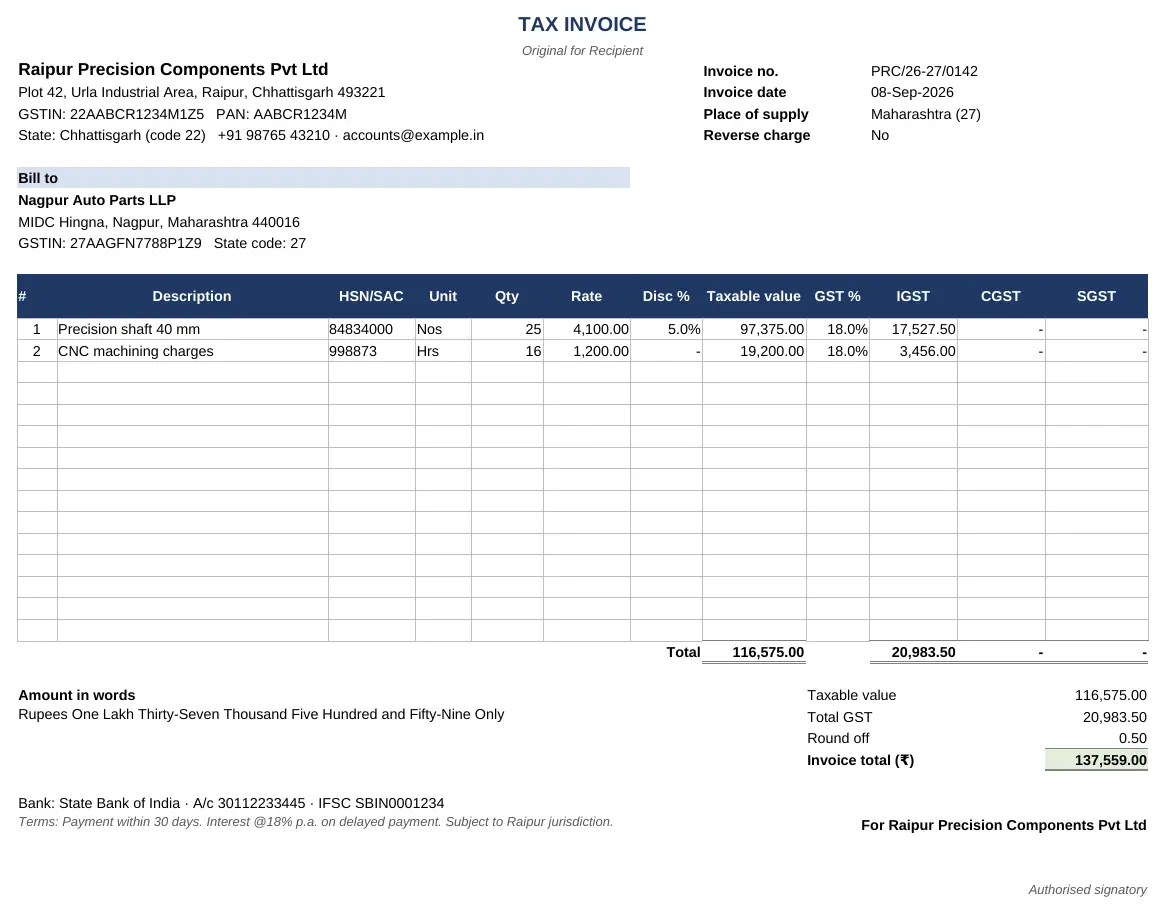
Keep customers and items once, record each sale in the sales register, and print any invoice by picking its number. The workbook reads the customer's state from the GSTIN, charges CGST + SGST within your state or IGST outside it, and prints a tax invoice with every rule 46 particular – including the amount in words.

For: Small businesses, traders, manufacturers and service providers registered under GST who invoice from Excel.

Free download · no sign-up · no macros · Excel 2010+, Google Sheets, LibreOffice

Preview of the GST Invoice Format & Sales Register Excel template with sample data
Main sheet with sample data

At a glance

What it is
GST Invoice Format & Sales Register — an Excel workbook for Indian businesses and accountants
Free edition
7 sheets (Guide, Settings, Customers, Items, Sales Register, Invoice, Summary) — free download, no sign-up
Pro edition
10 sheets, adds GSTR-1 Summary and Credit & Debit Notes and Payments & Outstanding — ₹19 one-time (regular ₹99)
Works in
Microsoft Excel 2010 or later, Google Sheets, LibreOffice Calc — no macros
Checked
Recalculated with zero formula errors; sample data and a Guide sheet included
Made by
Prakash Bagchi, finance professional, PB Lab (Raipur, India)

Free vs Pro: what you get

SheetFreePro
Guide
What it does, how to use it, assumptions and a live status check
Settings
Your business name, address, GSTIN, bank details, terms and invoice title
Customers
Customer master – state code taken from the GSTIN, or chosen for unregistered buyers
Items
Goods and services with HSN/SAC, unit, rate and GST % (0%, 0.25%, 3%, 5%, 18%, 40%)
Sales Register
One row per invoice line for up to 1,000 lines, with tax split and B2B / B2CL / B2CS type
Invoice
Print-ready A4 tax invoice for any invoice number, with amount in words and round-off
Summary
Monthly B2B and B2C totals, invoice count, GSTR-1 due date and checks
GSTR-1 Summary
Table 4A B2B invoice-wise, Table 7 B2C by state and rate, Table 9B notes, Table 12 HSN summary (B2B/B2C) and Table 13 documents
—
Credit & Debit Notes
Notes for returns and price changes with automatic IGST or CGST/SGST
—
Payments & Outstanding
Receipts and customer TDS against each invoice, balance due, days overdue and status
—

Pro edition

Get GST Invoice Format & Sales Register – Pro

₹19₹9981% OFF

Everything in the free edition, plus:

  • GSTR-1 Summary — Table 4A B2B invoice-wise, Table 7 B2C by state and rate, Table 9B notes, Table 12 HSN summary (B2B/B2C) and Table 13 documents
  • Credit & Debit Notes — Notes for returns and price changes with automatic IGST or CGST/SGST
  • Payments & Outstanding — Receipts and customer TDS against each invoice, balance due, days overdue and status
  • One-time payment, instant .xlsx download, free updates
+91

Secure payment by Razorpay · UPI, cards, netbanking & wallets

We use your details only to deliver the file and support your purchase. See our privacy policy and terms.

Need more than one? The Finance & Accounts Kit has all 14 finance Pro templates, including this one, for ₹208.

How to use it

  1. 1Download the free file and read the Guide sheet.
  2. 2On Settings, enter your business name, address, GSTIN, bank details and terms.
  3. 3Add your customers (with GSTIN, or the state for unregistered buyers) and your items with HSN/SAC and GST rate.
  4. 4In the Sales Register, add one row per invoice line: invoice number, date, customer, item and quantity.
  5. 5On Invoice, pick the invoice number in N3 and print on A4.

What a GST tax invoice must show

Rule 46 of the CGST Rules lists what a tax invoice must contain: your name, address and GSTIN; a consecutive invoice number of up to 16 characters that is unique for the financial year; the date; the recipient's name, address and GSTIN (or, for an unregistered buyer, the state where the supply is made); HSN or SAC codes; description, quantity and unit; the taxable value after discounts; the rate and amount of CGST, SGST or IGST; the place of supply; whether tax is payable on reverse charge; and a signature. The printed invoice in this template carries all of these.

HSN digits depend on turnover: 4 digits if your aggregate turnover in the previous year was up to ₹5 crore (mandatory on B2B invoices) and 6 digits above ₹5 crore.

CGST + SGST or IGST – decided by the place of supply

If the place of supply is in the same state as you, the supply is intra-state and tax is split equally between CGST and SGST. If it is in another state, the supply is inter-state and IGST is charged at the full rate. For goods the place of supply is usually where delivery ends; for most services to a registered customer it is the customer's location. The template reads the state code from the first two digits of the customer's GSTIN (or the state you pick for an unregistered buyer), compares it with your own GSTIN and splits the tax automatically.

GST rates after September 2025

From 22 September 2025 most goods and services are taxed at either 5% or 18%, with a 40% rate for a short list of luxury and sin goods; special rates of 0%, 0.25% and 3% remain for specific items such as precious stones and gold. The Items sheet offers these rates in a drop-down, but always check the current rate for your HSN code before invoicing.

From invoices to GSTR-1

Every invoice ends up in GSTR-1, due by the 11th of the following month (quarterly QRMP filers file by the 13th after the quarter). B2B invoices are reported one by one; inter-state invoices to unregistered buyers above ₹1 lakh are reported as B2C large; everything else to unregistered buyers is summarised by state and rate as B2C small. The Sales Register tags every line with its type, and the Summary gives the month's totals. The Pro edition goes further and lays out the GSTR-1 tables – including the HSN summary split between B2B and B2C – ready to fill in or check against your return.

When you need e-invoicing

If your aggregate turnover in any year since 2017-18 exceeded ₹5 crore, B2B invoices must also be reported to the Invoice Registration Portal to get an IRN and QR code, and businesses above ₹10 crore must report within 30 days of the invoice date. This workbook doesn't generate IRNs, so it suits businesses below the e-invoicing threshold, or as a working register alongside the portal.

Free vs Pro

The free edition covers invoicing, the sales register and monthly totals. The Pro edition adds the GSTR-1 working, a credit and debit note register that flows into it, and a receivables sheet that tracks payments, TDS deducted by customers and overdue invoices.

Written by Prakash Bagchi, finance professional and founder of PB Lab. Last reviewed .

Frequently asked questions

What details are mandatory on a GST invoice?

Supplier name, address and GSTIN; a unique serial number up to 16 characters; date; recipient details and GSTIN; HSN/SAC; description, quantity and unit; taxable value; GST rate and amount (CGST/SGST or IGST); place of supply; reverse charge status; and signature (rule 46 of the CGST Rules).

When is IGST charged instead of CGST and SGST?

When the place of supply is in a different state from the supplier – an inter-state supply. Within the same state, tax is split equally into CGST and SGST.

How many digits of HSN code should I use?

4 digits if your aggregate turnover in the previous year was up to ₹5 crore (mandatory for B2B invoices), and 6 digits if it was above ₹5 crore.

What are the GST rates now?

From 22 September 2025 the main rates are 5% and 18%, with 40% for certain luxury and sin goods, plus special rates of 0%, 0.25% and 3% for specific items.

Can I use this if I have to generate e-invoices?

It doesn't create IRNs or QR codes. Businesses with aggregate turnover above ₹5 crore must report B2B invoices on the e-invoice portal.

Does it print the amount in words?

Yes – in the Indian system (lakh and crore), with rounding to the nearest rupee shown as a separate line.

When is GSTR-1 due?

By the 11th of the next month for monthly filers; quarterly (QRMP) filers file by the 13th of the month after the quarter.

How much does the Pro edition cost and how do I get it?

The Pro edition is ₹19 (regular price ₹99), a one-time payment through Razorpay by UPI, card, netbanking or wallet. You download the .xlsx file right after paying, and the download page works again later if you bookmark it. Pro adds: GSTR-1 Summary, Credit & Debit Notes, Payments & Outstanding.

Related free calculators

More Excel templates

See all templates →

Disclaimer: This template is a working aid, not legal, tax or accounting advice. Sample data is fictional. Laws, rates and thresholds change — verify them against the current Act, rules and notifications, or with a qualified professional, before relying on the results. PB Lab is not responsible for decisions made using this file.