Excel template · HR & payroll

CTC to Salary Structure Calculator in Excel (50% Wage Rule)

Enter an annual CTC and the city. The builder sets Basic + DA as a share of CTC, adds HRA, works out employer PF, ESI and gratuity, and fills the rest with a special allowance so the structure adds up exactly to the CTC – then estimates monthly deductions and take-home pay and checks the 50% wage rule.

For: HR teams, founders and accountants preparing offers, appraisals and salary revisions.

Free download · no sign-up · no macros · Excel 2010+, Google Sheets, LibreOffice

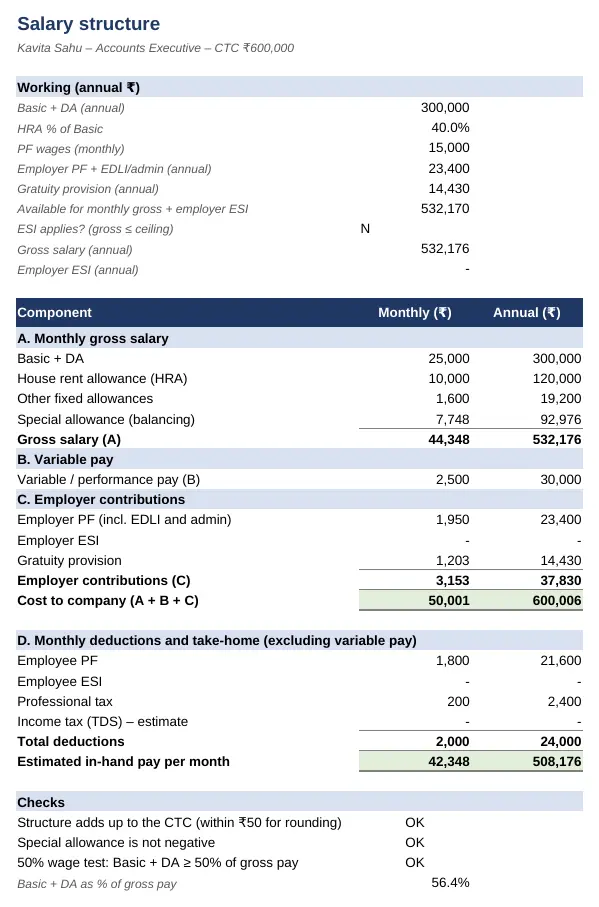
Preview of the CTC to Salary Structure Builder Excel template with sample data
Main sheet with sample data

At a glance

What it is
CTC to Salary Structure Builder — an Excel workbook for Indian employers, HR and payroll teams
Free edition
3 sheets (Guide, Inputs, Salary Structure) — free download, no sign-up
Pro edition
5 sheets, adds Employees and Offer Annexure — ₹19 one-time (regular ₹99)
Works in
Microsoft Excel 2010 or later, Google Sheets, LibreOffice Calc — no macros
Checked
Recalculated with zero formula errors; sample data and a Guide sheet included
Made by
Prakash Bagchi, finance professional, PB Lab (Raipur, India)

Free vs Pro: what you get

SheetFreePro
Guide
What it does, how to use it, assumptions and a live status check
Inputs
CTC, variable pay, city and your salary policy, with 2026-27 tax slabs for the estimate
Salary Structure
Monthly and annual structure, employer contributions, deductions, in-hand pay and checks
Employees
Structures for up to 200 employees at once, with a CTC check on every row
—
Offer Annexure
Print-ready 'Annexure A – Compensation structure' for the offer letter
—

Pro edition

Get CTC to Salary Structure Builder – Pro

₹19₹9981% OFF

Everything in the free edition, plus:

  • Employees — Structures for up to 200 employees at once, with a CTC check on every row
  • Offer Annexure — Print-ready 'Annexure A – Compensation structure' for the offer letter
  • One-time payment, instant .xlsx download, free updates
+91

Secure payment by Razorpay · UPI, cards, netbanking & wallets

We use your details only to deliver the file and support your purchase. See our privacy policy and terms.

Need more than one? The HR & Payroll Kit has all 9 hr & payroll Pro templates, including this one, for ₹134.

How to use it

  1. 1Download the free file and read the Guide sheet.
  2. 2Enter the employee's annual CTC, variable pay and city type on Inputs.
  3. 3Review the salary policy: Basic %, HRA %, PF basis, gratuity loading, ESI and professional tax.
  4. 4Read the structure and in-hand estimate on Salary Structure; all checks should show OK.
  5. 5If the special allowance is negative or the 50% test fails, adjust Basic % or the fixed allowances.

CTC, gross and in-hand are different

Cost to company (CTC) is everything the employer spends on an employee in a year: monthly gross salary, variable pay, and the employer's own contributions such as PF, ESI and the gratuity provision. Gross salary is what appears on the payslip before deductions. In-hand pay is gross less the employee's PF, ESI, professional tax and TDS. Offers are usually made in CTC, which is why a clear structure avoids disappointment when the first salary arrives.

How the builder works

Basic + DA is set as a percentage of CTC (50% by default). HRA is a percentage of Basic – 50% in a metro and 40% elsewhere is the common policy. Employer PF is 12% of PF wages (restricted to ₹15,000 if you choose) plus EDLI and admin charges; gratuity is provided at 4.81% of Basic (15/26 ÷ 12). If monthly gross works out to ₹21,000 or less, employer ESI at 3.25% is included too. Whatever is left after these is the special allowance, so the structure always adds up to the CTC.

The 50% wage rule

The labour codes, in force from 21 November 2025, define wages as Basic + DA (and retaining allowance) and add back allowances that exceed 50% of total pay. Structures with a low Basic and large allowances therefore don't reduce PF, gratuity or bonus as they once did. The builder checks that Basic + DA is at least 50% of gross pay and shows the actual percentage, so you can design structures that are compliant from the start.

Estimating take-home pay

The in-hand estimate deducts employee PF, ESI where applicable, professional tax and an estimate of TDS. The TDS estimate uses the tax year 2026-27 slabs: under the new regime there is no tax on income up to ₹12 lakh after the ₹75,000 standard deduction, with marginal relief just above. For the exact tax, including HRA exemption and deductions in the old regime, use the Salary TDS Calculator template.

For HRA, the Income-tax Rules, 2026 treat eight cities as metros for the 50% limit: Delhi, Mumbai, Kolkata, Chennai, Bengaluru, Hyderabad, Pune and Ahmedabad.

Free vs Pro

The free edition builds one structure at a time. The Pro edition builds structures for up to 200 employees in one sheet – useful for annual increments – and creates a printable compensation annexure for any employee to attach to the offer or revision letter.

Written by Prakash Bagchi, finance professional and founder of PB Lab. Last reviewed .

Frequently asked questions

What is the difference between CTC and in-hand salary?

CTC includes employer PF, ESI, gratuity and variable pay. In-hand salary is the monthly gross less employee PF, ESI, professional tax and TDS.

What is the 50% wage rule?

Under the Code on Wages, 2019, in force from 21 November 2025, allowances above 50% of total pay are added back to wages. Keeping Basic + DA at 50% or more of pay avoids surprises in PF, gratuity and bonus.

How much gratuity is included in CTC?

Usually 4.81% of Basic (15/26 ÷ 12). The template lets you change the percentage.

How much HRA should be given?

Commonly 50% of Basic in a metro and 40% elsewhere. For tax exemption, the Income-tax Rules, 2026 treat Delhi, Mumbai, Kolkata, Chennai, Bengaluru, Hyderabad, Pune and Ahmedabad as metros.

Is the tax estimate exact?

No – it is an estimate on gross and variable pay with the standard deduction and rebate. Use the Salary TDS Calculator for the full computation.

Can I make structures for all employees at once?

Yes, with the Pro edition's Employees sheet (up to 200 employees), which also checks that each structure adds up to its CTC.

How much does the Pro edition cost and how do I get it?

The Pro edition is ₹19 (regular price ₹99), a one-time payment through Razorpay by UPI, card, netbanking or wallet. You download the .xlsx file right after paying, and the download page works again later if you bookmark it. Pro adds: Employees, Offer Annexure.

Related free calculators

More Excel templates

See all templates →

Disclaimer: This template is a working aid, not legal, tax or accounting advice. Sample data is fictional. Laws, rates and thresholds change — verify them against the current Act, rules and notifications, or with a qualified professional, before relying on the results. PB Lab is not responsible for decisions made using this file.