Excel template · Finance

Loan Amortisation Schedule in Excel (EMI, Prepayment & Rate Change)

Enter the loan amount, rate, tenure and first EMI date to get the EMI and a month-by-month split of interest and principal. Add floating-rate changes and part-prepayments, choose whether to keep the EMI or the tenure, and see how many EMIs and how much interest you save.

For: Home, car, business and personal loan borrowers, and accountants maintaining loan schedules for the books.

Free download · no sign-up · no macros · Excel 2010+, Google Sheets, LibreOffice

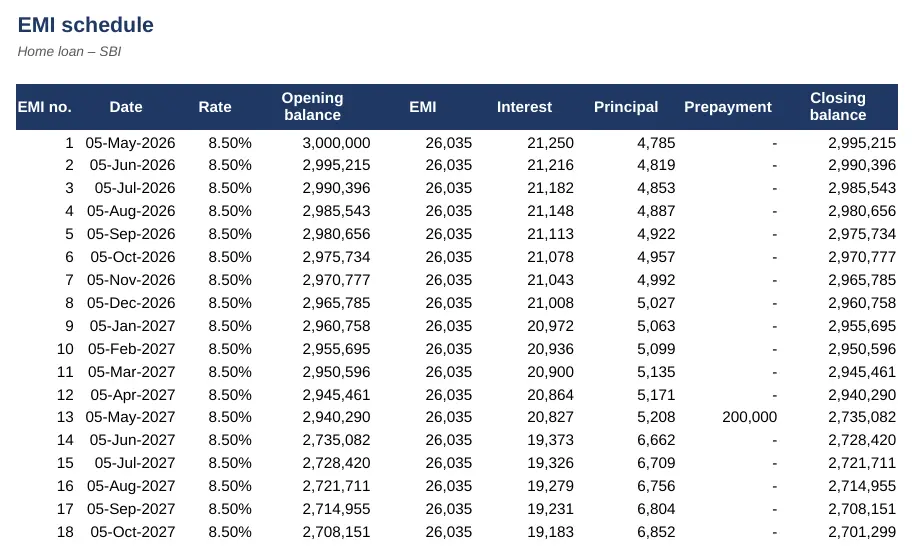
Preview of the Loan Amortisation & EMI Schedule Excel template with sample data
Main sheet with sample data

At a glance

What it is
Loan Amortisation & EMI Schedule — an Excel workbook for Indian businesses and accountants
Free edition
4 sheets (Guide, Loan Details, Schedule, Summary) — free download, no sign-up
Pro edition
6 sheets, adds Year-wise & Tax and Compare Loans — ₹19 one-time (regular ₹99)
Works in
Microsoft Excel 2010 or later, Google Sheets, LibreOffice Calc — no macros
Checked
Recalculated with zero formula errors; sample data and a Guide sheet included
Made by
Prakash Bagchi, finance professional, PB Lab (Raipur, India)

Free vs Pro: what you get

SheetFreePro
Guide
What it does, how to use it, assumptions and a live status check
Loan Details
Amount, rate, tenure, first EMI date, rate changes and part-prepayments
Schedule
360-month schedule: opening balance, EMI, interest, principal, prepayment and closing balance
Summary
Total interest, EMIs, last EMI date and savings against the original plan, with a year-wise chart
Year-wise & Tax
April–March interest and principal, current / non-current split for the balance sheet, home-loan deductions (old regime)
—
Compare Loans
Three offers side by side: EMI, total interest, fees, total cost and effective annual rate (APR)
—

Pro edition

Get Loan Amortisation & EMI Schedule – Pro

₹19₹9981% OFF

Everything in the free edition, plus:

  • Year-wise & Tax — April–March interest and principal, current / non-current split for the balance sheet, home-loan deductions (old regime)
  • Compare Loans — Three offers side by side: EMI, total interest, fees, total cost and effective annual rate (APR)
  • One-time payment, instant .xlsx download, free updates
+91

Secure payment by Razorpay · UPI, cards, netbanking & wallets

We use your details only to deliver the file and support your purchase. See our privacy policy and terms.

Need more than one? The Finance & Accounts Kit has all 14 finance Pro templates, including this one, for ₹208.

How to use it

  1. 1Download the free file and read the Guide sheet.
  2. 2On Loan Details, enter the loan amount, starting rate, tenure in months and first EMI date.
  3. 3Add any rate changes (from which EMI) and part-prepayments (with which EMI).
  4. 4Choose whether the bank keeps your EMI and shortens the tenure, or keeps the tenure and lowers the EMI.
  5. 5Read the Schedule and Summary – compare interest and EMIs with and without your changes.

How EMI is calculated

An equated monthly instalment (EMI) repays a loan in equal monthly amounts. The formula is EMI = P × r × (1 + r)^n ÷ ((1 + r)^n − 1), where P is the loan amount, r the monthly interest rate (annual rate ÷ 12) and n the number of months. For ₹30 lakh at 8.5% over 20 years, the EMI is about ₹26,035.

Each month, interest is charged on the outstanding balance and the rest of the EMI repays principal. In the early years most of the EMI is interest; towards the end most of it is principal. The schedule shows this split month by month, so you can see exactly how the balance comes down.

Floating rates: keep the EMI or the tenure?

Most home loans in India are floating-rate loans linked to an external benchmark such as the RBI repo rate, so the rate changes during the loan. When it does, banks usually keep the EMI the same and change the number of remaining EMIs; some let you keep the tenure and change the EMI instead. The template does either. If a rate rise makes the EMI smaller than the month's interest, the Summary flags it – that is the point to ask the lender to raise your EMI.

Why part-prepayments save so much

A prepayment goes straight to principal, so every later month's interest is lower. Paid early in the loan it can cut years off the tenure. In the sample, prepayments of ₹2 lakh and ₹3 lakh in the second and fourth years, together with the rate changes, close a 20-year loan more than five years early and save over ₹12 lakh of interest. Banks generally don't charge prepayment or foreclosure penalties on floating-rate loans taken by individuals, but check your loan agreement.

Using the schedule in your accounts

For a business, the loan has to be split in the balance sheet between the amount repayable within twelve months (shown under current liabilities as current maturities of long-term borrowings) and the rest (non-current). The Pro edition works this out for any balance-sheet date and gives interest and principal for each financial year, which is also what you need to check the lender's interest certificate. For a self-occupied house, interest up to ₹2 lakh and principal within the ₹1.5 lakh investment limit are deductible only in the old tax regime.

Free vs Pro

The free edition gives the full schedule with rate changes and prepayments. The Pro edition adds the financial-year and balance-sheet working, and a comparison of three loan offers that includes processing fees and shows the effective annual rate (APR) – the true cost of borrowing.

Written by Prakash Bagchi, finance professional and founder of PB Lab. Last reviewed .

Frequently asked questions

What is the formula for EMI?

EMI = P × r × (1 + r)^n ÷ ((1 + r)^n − 1), where P is the loan amount, r the monthly rate (annual rate ÷ 12) and n the number of monthly instalments. In Excel: =PMT(rate/12, months, −amount).

Is it better to reduce EMI or tenure after a prepayment?

Reducing the tenure (keeping the EMI) saves more interest. Reducing the EMI eases monthly cash flow. The template shows both so you can compare.

What happens to my EMI when the repo rate changes?

For floating-rate loans the bank changes the interest rate; usually the EMI stays the same and the number of EMIs changes. Enter the new rate from the EMI number it applies to.

Do banks charge for prepaying a home loan?

Banks generally don't charge prepayment or foreclosure penalties on floating-rate loans to individual borrowers. Fixed-rate and business loans may have charges – check your agreement.

Why does my bank's schedule differ slightly?

Banks may calculate interest on a daily basis and round differently. Expect differences of a few rupees a month.

How do I show a loan in the balance sheet?

Split it into the principal repayable within 12 months (current maturities, under short-term borrowings) and the rest (long-term borrowings). The Pro edition calculates this for any date.

How much does the Pro edition cost and how do I get it?

The Pro edition is ₹19 (regular price ₹99), a one-time payment through Razorpay by UPI, card, netbanking or wallet. You download the .xlsx file right after paying, and the download page works again later if you bookmark it. Pro adds: Year-wise & Tax, Compare Loans.

Related free calculators

More Excel templates

See all templates →

Disclaimer: This template is a working aid, not legal, tax or accounting advice. Sample data is fictional. Laws, rates and thresholds change — verify them against the current Act, rules and notifications, or with a qualified professional, before relying on the results. PB Lab is not responsible for decisions made using this file.