Excel template · HR & payroll

Employee Master & Onboarding Checklist in Excel (KYC, Probation)

One master record for every employee – joining date, department, manager, PAN, UAN, ESIC, bank and contact details – with a 16-point onboarding and KYC checklist. Probation and confirmation dates are worked out from the date of joining, and an action list shows overdue confirmations and pending documents.

For: HR teams, office managers and founders of small and mid-sized Indian businesses, and payroll consultants who keep employee records for clients.

Free download · no sign-up · no macros · Excel 2010+, Google Sheets, LibreOffice

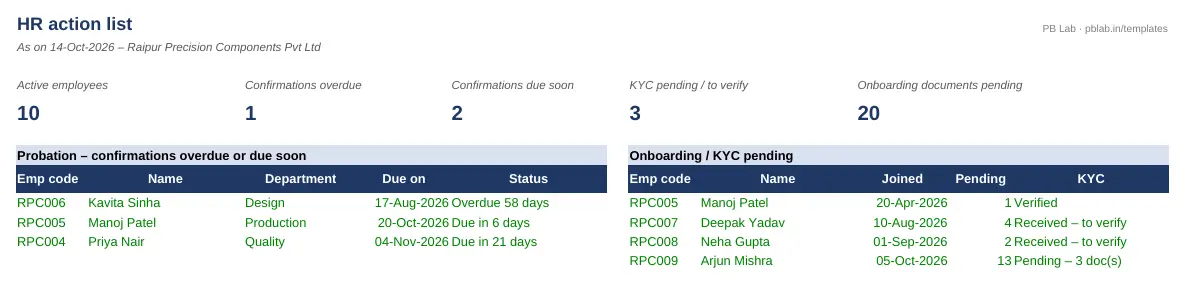
Preview of the Employee Master & Onboarding Checklist Excel template with sample data
Main sheet with sample data

At a glance

What it is
Employee Master & Onboarding Checklist — an Excel workbook for Indian employers, HR and payroll teams
Free edition
5 sheets (Guide, Settings, Employees, Onboarding Checklist, Action List) — free download, no sign-up
Pro edition
8 sheets, adds Dashboard and Employee Profile and Assets & Access — ₹19 one-time (regular ₹99)
Works in
Microsoft Excel 2010 or later, Google Sheets, LibreOffice Calc — no macros
Checked
Recalculated with zero formula errors; sample data and a Guide sheet included
Made by
Prakash Bagchi, finance professional, PB Lab (Raipur, India)

Free vs Pro: what you get

SheetFreePro
Guide
What it does, how to use it, assumptions and a live status check
Settings
Company name, today's date, default probation period, departments and employment types
Employees
Up to 200 employees: joining, probation and confirmation, manager, PAN (format-checked), Aadhaar and bank last 4 digits, UAN, ESIC, KYC status and exit date
Onboarding Checklist
16 documents and steps per employee – Verified, Received, Pending or N/A – with % done and KYC status
Action List
Headline counts plus confirmations overdue or due soon and employees with documents or KYC pending
Dashboard
Active headcount by department and employment type, joiners and leavers by month, closing headcount and attrition
—
Employee Profile
Pick an employee code for a printable one-page profile with every document's status
—
Assets & Access
Laptops, phones, ID cards and logins issued and returned, flagging anything still with employees who have left
—

Pro edition

Get Employee Master & Onboarding Checklist – Pro

₹19₹9981% OFF

Everything in the free edition, plus:

  • Dashboard — Active headcount by department and employment type, joiners and leavers by month, closing headcount and attrition
  • Employee Profile — Pick an employee code for a printable one-page profile with every document's status
  • Assets & Access — Laptops, phones, ID cards and logins issued and returned, flagging anything still with employees who have left
  • One-time payment, instant .xlsx download, free updates
+91

Secure payment by Razorpay · UPI, cards, netbanking & wallets

We use your details only to deliver the file and support your purchase. See our privacy policy and terms.

Need more than one? The HR & Payroll Kit has all 9 hr & payroll Pro templates, including this one, for ₹134.

How to use it

  1. 1Download the free file and read the Guide sheet.
  2. 2On Settings, enter the company name, default probation period and your departments.
  3. 3On Employees, add one row per employee with joining date, probation and statutory numbers.
  4. 4On Onboarding Checklist, mark each document Verified, Received, Pending or N/A.
  5. 5Check the Action List every week for confirmations due and documents pending.

Why keep an employee master

Payroll, PF, ESI, TDS, gratuity and the full and final settlement all start from the same few facts: who the employee is, when they joined, what their statutory numbers are and where their salary goes. Keeping those in one master sheet – rather than scattered across offer letters, emails and the payroll software – means every other register can pick them up, and nothing is missed when an inspector, auditor or bank asks.

The onboarding checklist

The checklist covers 16 items: offer letter accepted, appointment letter issued, PAN, Aadhaar (masked copy), address proof, photograph, bank details, educational certificates, the previous employer's relieving letter and salary details for TDS, PF UAN and declaration, ESIC declaration, PF and gratuity nominations, background verification, policies signed (code of conduct, POSH, NDA), assets and system access, and adding the employee to payroll.

Each item is Verified (checked against the original), Received (copy collected, not yet checked), Pending or N/A. KYC is shown as Verified only when PAN, Aadhaar and bank details are all verified. Under the OSH Code, 2020 every employer must issue an appointment letter to each employee, so it is on the list for everyone.

Probation and confirmation

Enter the probation period in months (the default comes from Settings) and any extension. The confirmation due date is the date of joining plus probation plus extension. The Probation status column shows Confirmed, On probation, Due in N days or Overdue, and confirmations due within your chosen window appear on the Action List with the department, so managers can be reminded before the date passes.

Personal data and the DPDP Act

Employee records are personal data under the Digital Personal Data Protection Act, 2023. The template is designed to hold only what HR needs day to day: the last four digits of Aadhaar and the bank account rather than the full numbers, which should stay in the original documents or the payroll system. Keep the file access-controlled and remove records you no longer need.

Free vs Pro

The free edition has the employee master, onboarding checklist and action list. The Pro edition adds a headcount and attrition dashboard, a printable employee profile and an asset and access register for exits.

Written by Prakash Bagchi, finance professional and founder of PB Lab. Last reviewed .

Frequently asked questions

What documents are needed when an employee joins in India?

Typically PAN, Aadhaar, address proof, photograph, bank details, educational certificates, the previous employer's relieving letter and salary details, PF UAN and declaration, ESIC declaration if applicable, and nominations for PF and gratuity.

Is an appointment letter mandatory?

Yes. Under the OSH Code, 2020 every employer must issue an appointment letter to each employee. The checklist includes it for every employee.

How is the confirmation date worked out?

Date of joining plus the probation period plus any extension, in months. Enter the date you confirm the employee and the status changes to Confirmed.

Should I store full Aadhaar numbers?

Avoid it. Keep only the last four digits in shared HR files and a masked copy of the card. The full number stays with the original documents or the payroll system.

Can I add my own departments and checklist items?

Departments and employment types are lists on Settings. The checklist has 16 standard items; rename a column if your process differs.

What happens when an employee leaves?

Enter the date of leaving: the status changes to Exited and they drop out of the action list. Pro's Assets & Access sheet flags anything they haven't returned.

How much does the Pro edition cost and how do I get it?

The Pro edition is ₹19 (regular price ₹99), a one-time payment through Razorpay by UPI, card, netbanking or wallet. You download the .xlsx file right after paying, and the download page works again later if you bookmark it. Pro adds: Dashboard, Employee Profile, Assets & Access.

Related free calculators

More Excel templates

See all templates →

Disclaimer: This template is a working aid, not legal, tax or accounting advice. Sample data is fictional. Laws, rates and thresholds change — verify them against the current Act, rules and notifications, or with a qualified professional, before relying on the results. PB Lab is not responsible for decisions made using this file.