Excel template · Home & society

Household Budget & Monthly Expense Tracker in Excel (India)

Set a monthly budget for each category, record income, spending and transfers across your bank account, UPI wallet, cash and credit card, and see budget vs actual for any month, the whole year by category with your savings rate and 50/30/20 split, and the balance of every account.

For: Families, couples, salaried professionals and students in India who want to see where the money goes each month and save more.

Free download · no sign-up · no macros · Excel 2010+, Google Sheets, LibreOffice

Step-by-step guide: How to Make a Monthly Household Budget in Excel (India)

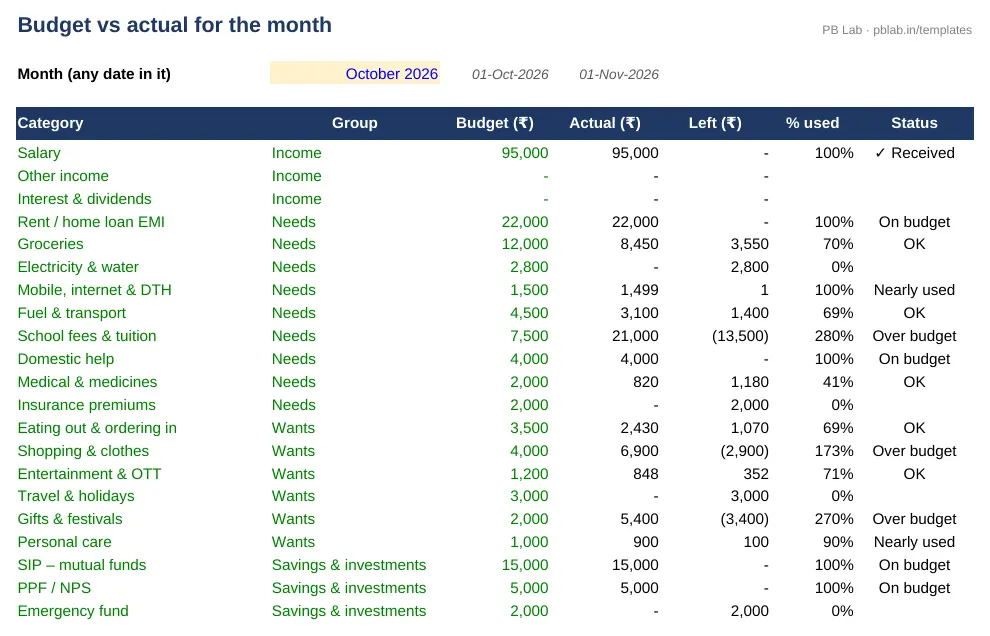
Preview of the Personal Budget & Household Expense Tracker Excel template with sample data
Main sheet with sample data

At a glance

What it is
Personal Budget & Household Expense Tracker — an Excel workbook for Indian families, housing societies and RWAs
Free edition
6 sheets (Guide, Setup, Transactions, Monthly Budget, Year Summary, Balances) — free download, no sign-up
Pro edition
9 sheets, adds Savings Goals and Bills & EMIs and Net Worth — ₹19 one-time (regular ₹99)
Works in
Microsoft Excel 2010 or later, Google Sheets, LibreOffice Calc — no macros
Checked
Recalculated with zero formula errors; sample data and a Guide sheet included
Made by
Prakash Bagchi, finance professional, PB Lab (Raipur, India)

Free vs Pro: what you get

SheetFreePro
Guide
What it does, how to use it, assumptions and a live status check
Setup
Household name, year start, 40 categories in groups (income, needs, wants, savings, transfer) with monthly budgets, and up to 10 accounts with opening balances
Transactions
Up to 3,000 entries with date, description, category, account, amount and 'to account' for transfers
Monthly Budget
Budget vs actual for every category in any month, with % used, status, needs/wants/savings split and savings rate
Year Summary
Every category month by month for the year, totals, average per month, budget for the year and savings rate
Balances
Opening, money in, money out and balance for each account, with a column to match your statements
Savings Goals
Target, date and progress for each goal, and the amount to save every month
—
Bills & EMIs
Rent, EMIs, SIPs, premiums and utility bills with due dates, marked paid automatically from your transactions
—
Net Worth
What you own and owe – savings, mutual funds, PPF, EPF, gold, loans – and the change since your last update
—

Pro edition

Get Personal Budget & Household Expense Tracker – Pro

₹19₹9981% OFF

Everything in the free edition, plus:

  • Savings Goals — Target, date and progress for each goal, and the amount to save every month
  • Bills & EMIs — Rent, EMIs, SIPs, premiums and utility bills with due dates, marked paid automatically from your transactions
  • Net Worth — What you own and owe – savings, mutual funds, PPF, EPF, gold, loans – and the change since your last update
  • One-time payment, instant .xlsx download, free updates
+91

Secure payment by Razorpay · UPI, cards, netbanking & wallets

We use your details only to deliver the file and support your purchase. See our privacy policy and terms.

How to use it

  1. 1Download the free file and read the Guide sheet.
  2. 2On Setup, rename categories to suit your home, set monthly budgets and list your accounts.
  3. 3Record each income, expense and transfer – daily, or weekly from your bank, UPI and card statements.
  4. 4Open Monthly Budget to see budget vs actual for the month.
  5. 5Check the Year Summary for your savings rate and Balances against your statements.

Why track household expenses

With UPI, cards and wallets, money leaves in many small amounts and it is easy to lose track. A simple record of every rupee in and out – grouped into a few categories – shows where the money actually goes, which spends can be trimmed and how much is really left to save or invest each month. Most people are surprised by the first full month.

Needs, wants and savings: the 50/30/20 guide

Each category belongs to a group. Needs are essentials such as rent or home-loan EMI, groceries, utilities, school fees, transport and insurance. Wants are lifestyle spends such as eating out, shopping, OTT and holidays. Savings & investments are SIPs, PPF, NPS and your emergency fund. A common starting point is about 50% of take-home pay on needs, 30% on wants and at least 20% saved. The Monthly Budget and Year Summary show your actual split and savings rate, so you can see how close you are.

Accounts, UPI, cards and transfers

List your bank accounts, UPI wallet, cash and credit cards with their opening balances (a credit card balance you owe is negative). Every transaction names the account it came from. Moving money between your own accounts – an ATM withdrawal, a wallet top-up or paying the credit card bill – is a transfer, not an expense, so a card purchase is counted once, on the day you swipe. The Balances sheet shows what each account should hold, and you can match it with your statements to catch missing entries.

Making the budget work

Set budgets from three months of actual spending rather than guesses, and review them every month. Fixed costs – rent, EMIs, fees, SIPs – are easy; the savings usually come from variable spends such as ordering in and online shopping. Pay yourself first: start SIPs and PPF on salary day so saving isn't left to whatever remains at month end. Keep an emergency fund of about six months of essential expenses before taking on new goals.

Free vs Pro

The free edition has the full budget, transactions, monthly and yearly reports and balances. The Pro edition adds savings goals with the monthly amount needed, a bills and EMIs checklist that marks itself paid, and a net worth statement.

Written by Prakash Bagchi, finance professional and founder of PB Lab. Last reviewed .

Frequently asked questions

What is the 50/30/20 budget rule?

A guide to split take-home pay: about 50% on needs, 30% on wants and 20% saved or invested. Use it as a starting point and adjust for rent, EMIs and family needs.

How should I record credit card spends?

Record each purchase as an expense from the credit card account on the day you swipe. Paying the card bill is a transfer from your bank to the card, so spending isn't counted twice.

Is an ATM withdrawal an expense?

No – it is a transfer from your bank to cash. Record the cash spends separately from the Cash account.

How much should I keep as an emergency fund?

About six months of essential expenses, in a savings account or liquid fund that you can withdraw quickly.

Can I change the categories?

Yes. Rename, add or remove categories on Setup and choose a group and a monthly budget for each. Reports update automatically.

Does it work on a phone?

Yes. Open it in Google Sheets or the Excel app to add transactions on your phone; the reports are best viewed on a larger screen.

Is my data uploaded anywhere?

No. It's a plain Excel file with no macros that stays on your computer or in your own cloud drive.

How much does the Pro edition cost and how do I get it?

The Pro edition is ₹19 (regular price ₹99), a one-time payment through Razorpay by UPI, card, netbanking or wallet. You download the .xlsx file right after paying, and the download page works again later if you bookmark it. Pro adds: Savings Goals, Bills & EMIs, Net Worth.

Related free calculators

More Excel templates

See all templates →

Disclaimer: This template is a working aid, not legal, tax or accounting advice. Sample data is fictional. Laws, rates and thresholds change — verify them against the current Act, rules and notifications, or with a qualified professional, before relying on the results. PB Lab is not responsible for decisions made using this file.